Production

How Virtual Production Studios Are Set Up and Operated: A Complete Guide

Virtual production studios are revolutionizing filmmaking by merging physical and virtual elements in real-time. Discover how these advanced facilities are set up, operated, and changing the craft of cinematic content creation.

VR
Victor Ren

April 5, 2026 · 8 min read

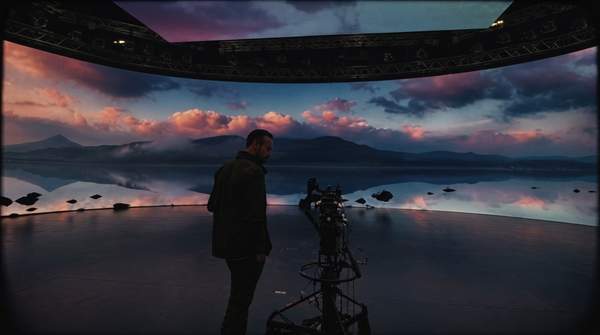
Actors on a virtual production set, surrounded by a large LED screen displaying an alien planet, with cameras capturing the real-time integration of digital and physical elements.

For a pivotal scene on an alien planet, directors traditionally filmed actors in front of a green screen, with the final world built months later in post-production. Virtual production studios now place actors in a studio where the alien landscape surrounds them in real-time on massive LED screens, reacting to camera movement. This technological shift fundamentally changes filmmaking craft.

What Is a Virtual Production Studio?

A virtual production studio is a specialized facility that merges physical and virtual elements to create cinematic content directly in-camera. These studios combine large-scale LED video walls, real-time rendering software, and precise camera tracking systems to replace traditional green screens. Instead of capturing actors against a blank backdrop and compositing digital environments later, virtual production displays photorealistic, three-dimensional worlds on the LED screens during the actual shoot. This allows filmmakers, cast, and crew to see the near-final shot as it is being filmed, creating a more immersive and efficient production environment.

From a technical standpoint, this process, often called in-camera visual effects (ICVFX), relies on the synergy of video game technology and conventional filmmaking techniques. The digital background is not a static image; it is a dynamic 3D environment that responds to the camera's movement. This creates realistic parallax—the effect where objects in the background move slower than objects in the foreground—which is essential for selling the illusion of depth. The result is a workflow where complex visual effects are captured live on set, significantly reducing the time and resources typically allocated to post-production.

How Virtual Production Works: A Step-by-Step Guide

Operating a virtual production studio requires a highly integrated workflow, shifting creative decision-making from post-production to pre-production. This demands meticulous planning and collaboration, beginning long before cameras roll.

  1. Step 1: Pre-production and Digital Asset CreationVirtual production begins with creating the digital environment. 3D artists build and optimize all virtual assets, from vast landscapes to detailed interior spaces, using real-time rendering software like Unreal Engine or Unity. Previsualization (previs) allows directors and cinematographers to explore the digital set, plan camera angles, and block scenes virtually, finalizing creative choices before the physical shoot. As noted by resources like Arctic7, free professional software such as Blender can also be used for 3D asset creation in more budget-conscious pipelines. A production designer plays a critical role here, ensuring the virtual world aligns with the project's overall visual language.
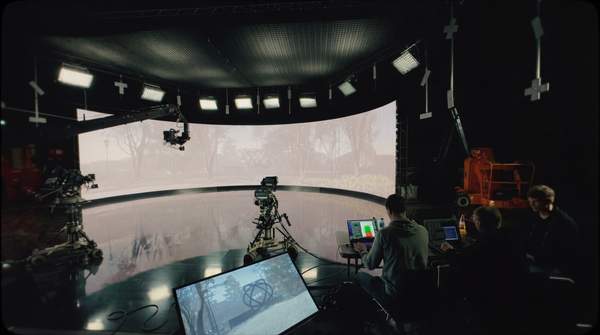
  2. Step 2: Physical Studio and Technology SetupPreparing the physical stage involves the LED volume—a large configuration of high-resolution LED video walls, often including ceiling and floor panels for an immersive space. According to industry resources like Arc Studios, these studios require not only the screens but also robust acoustic systems and significant cooling and insulation to manage the heat generated by the hardware. A powerful computer system with a high-end graphics processing unit (GPU) is required to run the real-time engine, while specialized cameras capable of live video output are needed for filming.
  3. Step 3: System Integration and CalibrationSystem integration and calibration synchronize all hardware and software components. The camera tracking system is meticulously calibrated with the real-time engine and LED wall. Sensors (e.g., infrared markers on set and camera) track the camera's exact 3D position, orientation, and lens settings, feeding this data to the rendering engine to adjust the 3D environment's perspective on the LED wall in real-time. Perfect calibration ensures the virtual background moves in sync with the physical camera, maintaining the illusion.
  4. Step 4: Live On-Set FilmingOnce calibrated and the digital environment loaded, filming begins. Actors perform on physical set pieces in the foreground, surrounded by the LED volume displaying the virtual world. Directors and cinematographers view a live, composited image on monitors, seeing actors seamlessly integrated into the digital backdrop. Interactive lighting from the LED screens realistically illuminates actors and physical props, creating natural reflections and ambient light difficult to replicate with a green screen. This allows immediate creative adjustments to lighting, camera movement, and performance based on the final-looking image.
  5. Step 5: Final Capture and In-Camera CompositingThe final composite is largely achieved in-camera. The camera records the live-action performance and the virtual background on LED screens as a single, unified image. The real-time engine renders the scene from the camera's precise viewpoint, creating a final pixel requiring minimal post-production. This workflow ensures the on-set monitor view closely matches the final product, offering transformative certainty for filmmakers.

Key Technologies in Virtual Production Studios

Virtual production studios rely on three core technological pillars: LED Video Walls, Real-Time Rendering Engines, and Camera Tracking Systems. These components work in harmony to blend real and digital worlds.

LED Video Walls: These sophisticated, high-resolution displays are engineered for on-camera performance. Key specifications include small pixel pitch for higher resolution, high refresh rates to avoid camera flickering, and a wide color gamut for accurate reproduction. As detailed by Refresh LED, the LED volume serves a dual purpose: as the visible background and the primary light source, casting dynamic, realistic light and reflections onto actors and physical sets.

Real-Time Rendering Engines: Gaming engines like Unreal Engine 5 and Unity are the industry-standard software generating the digital environment for virtual production. Designed to render complex 3D graphics at high frame rates, these engines instantly display virtual scenes on LED walls. They process camera tracking data to update the background's perspective in real-time, ensuring the virtual world behaves realistically when viewed through a moving camera.

Camera Tracking Systems: This technology forms the invisible link between the physical camera and the virtual world. Using methods like optical tracking with infrared cameras or inertial measurement units (IMUs), these systems determine the film camera's precise 3D position, rotation, focal length, and focus. This data stream, sent to the rendering engine dozens of times per second, enables the virtual environment to maintain perfect parallax and perspective relative to the camera's view, creating convincing, seamless integration.

Common Mistakes to Avoid in Virtual Production

The powerful virtual production workflow is complex, presenting new challenges. Avoiding common pitfalls is crucial for successful shoots, demanding productions prepare for its technical and creative requirements.

  • Underestimating Pre-Production: A frequent mistake is treating pre-production with the same mindset as a traditional shoot. In virtual production, the majority of creative decisions about the environment must be finalized *before* filming begins. Attempting to build or significantly alter digital assets on the day of the shoot is inefficient and costly. The workflow demands that the virtual world be considered "location-ready" before the crew arrives.
  • Neglecting System Calibration: The synchronization between the camera, tracking system, and rendering engine must be perfect. Even minor calibration errors can result in visual artifacts like a swimming background, incorrect perspective, or a noticeable delay (latency) between camera movement and the background's response. Teams must allocate sufficient time and expertise for meticulous calibration before every shoot.
  • Ignoring the LED Wall as a Light Source: Viewing the LED wall as merely a background replacement misses its most significant advantage. The light emitted from the screens provides realistic, interactive illumination on actors and physical sets. Cinematographers who fail to harness this capability and instead rely solely on traditional lighting setups miss an opportunity for more natural and immersive visuals.
  • Insufficient Hardware Power: Real-time rendering of high-fidelity 3D environments is an incredibly demanding task. As specified by industry guides from sources like AVIXA, virtual production platforms require powerful computers with top-tier GPUs. Skimping on hardware can lead to dropped frames, lower-resolution rendering, and an inability to handle complex scenes, compromising the final image quality.

Frequently Asked Questions

Can you do virtual production on a budget?

Yes, a functional virtual production setup is becoming more accessible. While large-scale LED volumes remain expensive, a budget-friendly pipeline can be assembled using more common hardware. According to a guide from Arctic7, a setup can be built with a powerful gaming PC, a consumer mirrorless camera with clean video output, and a high-quality projector instead of an LED wall for certain applications. Combining this with free professional software like Unreal Engine for the real-time environment, Blender for 3D modeling, and Aximmetry for compositing can create a viable, low-budget virtual production workflow.

How is virtual production different from a green screen?

The primary difference lies in real-time, in-camera results. With a green screen, actors perform against a blank backdrop, and the visual effects are added months later in post-production. Virtual production displays the final digital environment on set, allowing actors to react to their surroundings. Furthermore, the LED screens provide realistic lighting and reflections on the actors, an effect that must be manually and painstakingly recreated in post-production for green screen footage.

What skills are needed for a virtual production team?

A virtual production team is a hybrid of traditional film crew and video game development talent. In addition to directors, cinematographers, and gaffers, a virtual production requires specialists like Unreal Engine or Unity artists who build and manage the 3D environments, virtual production technicians who handle system calibration and integration, and 3D modelers who create digital assets. This convergence of skills is creating new, highly specialized roles within the entertainment industry.

The Bottom Line

Virtual production shifts complex visual effects work from post-production directly into the live-action shoot. This real-time technology integration provides creative control on set, enhances actor performances, and offers efficiencies in time and budget. Creators exploring this space should familiarize themselves with core software, like Unreal Engine, and experiment with previsualization to understand this planning-intensive workflow.