Virtual production is not a single expensive technology reserved for blockbuster LED stages. It is a flexible methodology built on real-time game engines, and independent filmmakers can adopt it at whatever scale their budget allows—from a green screen with real-time compositing to a small LED setup. The core shift is temporal: decisions that traditional filmmaking defers to the shoot day or the edit suite—environment design, camera blocking, lighting—must be locked in earlier, during pre-production, because they affect everything downstream. This guide walks through the three phases of a virtual production workflow and the accessible tools that make each one feasible for a smaller project.
Understanding Virtual Production for Independent Filmmakers
As Epic Games' Unreal Engine team explains, virtual production blends traditional techniques with digital innovations that leverage real-time game engines, and it is changing workflows across film, television, animation, and live events. The common misconception is that it means one thing—an LED volume. Arctic7's pipeline guide pushes back on this directly: virtual production "isn't a single, rigid method" but "a flexible suite of tools and techniques that can be adapted to fit a wide range of creative visions and budgets," from massive blockbusters to independent projects.
That flexibility is what makes the methodology viable for indie teams. Arctic7 notes that hardware costs are decreasing and real-time rendering software is becoming more user-friendly, opening the door for independent creators, with functional pipelines now being developed specifically for indie films and smaller projects. Autodesk's coverage adds a useful caution: like sound, color, and CGI before it, virtual production will suit some projects more than others, and understanding a production's needs is how you judge whether your project benefits.
Phase 1: Pre-production – The Foundation of Your Virtual World
Pre-production is where a virtual production succeeds or fails. StudioBinder's breakdown of the stages is blunt about this: "success comes from prep. Virtual production can save time later, but only if the planning starts early enough." The first task is digital asset creation and world-building. Arctic7's workflow guide describes how the digital assets for a film—character models through entire environments—are built in a game engine from the start, so the virtual world exists before anyone steps on set.
Once the environment exists, filmmakers can begin blocking scenes inside it. StudioBinder identifies this as one of virtual production's biggest strengths: directors, DPs, and producers can test framing, camera movement, and staging before the actual shoot day. That saves time, but more importantly, it makes decisions clearer. CG Spectrum's analysis reinforces the point—the detailed, highly visual planning that now takes place during pre-production streamlines every process that follows, and real-time editing capabilities mean filmmakers can get the shot right on day one rather than reassembling sets, actors, and crews for reshoots. StudioBinder also recommends building calibration and testing days into the schedule, a cost line indie producers should not skip.
Phase 2: On-Set Production – Real-Time Creativity in the Volume
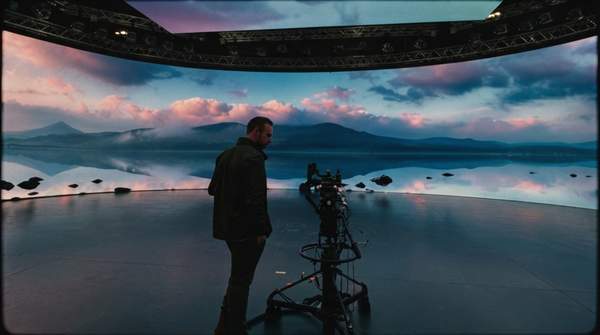
On set, the defining feature of virtual production is that the crew sees a near-final version of the shot while it is being filmed. StudioBinder draws the key contrast with green screen: green screen captures actors against a flat colored surface and adds the environment later in post, while virtual production displays the environment live during filming—giving filmmakers real-time creative control and letting the wall physically light the actors, which usually produces a more natural result.
Camera work also changes character. Autodesk's reporting describes how directors can control virtual cameras and gaming joysticks, and how game engines can encode the movement of cranes and jib arms to follow on-set camera movement, recreating that same movement inside the digital environment. This gives directors real-time control over the virtual scene that traditional workflows simply cannot offer on a shoot day. There is a performance benefit as well: CG Spectrum notes that LED stage volumes turn green screens into realistic environments surrounding the actor, allowing actors to become far more immersed in the scene and perform more authentically.
Phase 3: Post-Production – Final Polish and Integration
Post-production in a virtual workflow is less about creating effects and more about final polish and integration, because much of the compositing work was already resolved in real time on set. The efficiency gained in earlier stages significantly reduces the workload and time required at the end of the pipeline—VFX artists, as CG Spectrum observes, benefit from real-time rendering that speeds up processes and allows more experimentation.
There is also a longer-term asset benefit that matters to indie producers thinking beyond one project. Arctic7's workflow guide points out that with traditional methods a set is torn down after filming, but with virtual production the entire digital set can be repurposed—for instance, as a playable level in a video game or an explorable location in a VR app. That repurposing saves time and budget on future asset creation and keeps a visual identity consistent across projects. For a filmmaker building a body of work rather than a single film, the assets you build once can keep paying back.
Virtual Production Workflow Decision Framework
The matrix below maps key filmmaking decisions to the phase where a virtual workflow forces you to address them, contrasted with when traditional filmmaking typically handles the same decision. Use it to check, before you commit, that nothing is being deferred to a phase where it can no longer be changed cheaply.
| Phase | Key tasks and decisions | Indie accessibility and benefit |
|---|---|---|
| Pre-production | Create digital assets and build the virtual environment in a game engine; block scenes, test framing, camera movement, and staging inside the world. Environment design and camera blocking must be locked in earlier than in traditional workflows because they affect everything downstream. | Front-loading decisions reduces the need for physical set builds and reshoots. Requires early planning and scheduled calibration/testing days. |
| On-set production | Composite the environment live behind actors; operate virtual cameras and encode crane and jib movement into the digital environment; let the display light the actors. | Real-time compositing is achievable with green screen setups, not only LED walls. Actors gain immersion; directors gain immediate creative control. |
| Post-production | Final polish and integration only—much of the compositing was resolved in real time on set. | Reduced post workload and time; digital sets can be repurposed for future projects, spreading asset costs. |
The pattern the matrix reveals is the central trade-off of the methodology: you trade on-set improvisation for pre-production certainty. In traditional filmmaking, as StudioBinder notes, some choices are made on location or adjusted later; in a volume workflow, many must be locked in earlier. The payoff is that the shot is right on day one, and post-production shrinks.
Accessible Tools and Techniques for Indie Budgets
Choosing your setup is itself a pre-production decision, and the evidence is consistent that it should be shot-by-shot rather than all-or-nothing. Arctic7 describes the goal as building a versatile production toolkit—choosing the right tool for each specific shot based on creative goals, budget, and technical requirements, not replacing one set of tools with another. Three tiers are worth distinguishing.
- Green screen with real-time compositing: the most accessible entry point. The environment is added live rather than months later, giving real-time creative control without the cost of an LED wall.
- LED volume (in-camera VFX): displays the environment live and physically lights the actors, usually producing a more natural result, but at higher cost—better suited to specific shots that justify it.
- Virtual camera systems: game engines such as Unreal Engine and Unity have long contained virtual production tools, letting directors control virtual cameras and encode physical camera movement into the digital environment. These serve both pre-visualization and on-set control.
Autodesk's reporting traces these tools to productions like Jon Favreau's The Lion King, where virtual cameras and pre- and post-visualization had been in use well before the pandemic—evidence that the techniques are established, not experimental. This article deliberately stops short of a technical tutorial for any specific engine or a market survey of hardware; the decision that matters is which tier each shot needs.
Implementing Virtual Production: Your Next Steps
Independent filmmakers should prioritize thorough pre-production planning and digital asset creation to maximize the benefits of virtual production, choosing accessible tools that align with their project's scale and budget. Concretely: build your environment in a game engine before the shoot, block and test scenes inside it, schedule calibration and testing days, and assign each shot to the cheapest tool tier that achieves it—green screen compositing where possible, LED only where its lighting advantage is decisive.
The measurable indicator of success is the successful integration of real-time visualization and on-set adjustments, leading to reduced post-production time and costs. If your shoot day is producing near-final shots and your post schedule is shrinking rather than growing, the workflow is doing its job—and the digital assets you built once remain reusable for whatever you make next.
Sources
- Unrealengine
- How a Virtual Production Pipeline Works: A Full Guide — Arctic7
- Breaking Down the Virtual Production Workflow in Filmmaking — Arctic7
- Virtual production workflows are transforming content creation — Autodesk
- Virtual Production Stages Explained: How the Process Works — StudioBinder
- 5 Reasons to Choose Virtual Production for Filmmaking — Cgspectrum